

Privacy-First Group Email with Virtual Private Email (VPE)
The Problem
Most small business teams communicate over a mix of email addresses - personal accounts, freelancer domains, shared workgroup addresses, or some combination of all three. Regardless of which type, the same problems tend to appear.
When someone leaves the team, they walk away with the full contact history they accumulated while they were part of the group. Clients and vendors in live threads have direct lines to individual team members that persist long after those members have moved on. A compromised inbox exposes everyone in the thread. When a new person joins, they have to be added to existing threads individually - or they miss context entirely.
The problem is not limited to personal addresses. Even with a company workgroup tool, address exposure is structural. Anyone who has exchanged email with your team has those addresses, and nothing about the tool itself prevents that information from walking out the door.
Beyond address exposure, there is the email security problem that large enterprises solve with dedicated gateway products. Services like Proofpoint and Mimecast screen all inbound email before it reaches any employee - stripping tracking pixels, scanning attachments, blocking spoofed senders, and removing surveillance infrastructure embedded by third parties. Small businesses do not typically budget for those tools, but the threats they guard against do not scale down with the organization size.
EMail Parrot addresses both problems with a single service. It acts as a relay between everyone who communicates with your team - inside the group and outside it - and applies the same inbound screening used by enterprise gateway tools. Nobody ever sees a real email address except the administrator who set up the list. When someone leaves, they are removed from the list and the addresses they used to reach people stop working. No walk-away contact information, by design.
A second structural benefit applies to workgroup email specifically. Most team communication tools charge per seat, which creates pressure to keep address counts low. A five-person team gets five addresses. EMail Parrot changes this equation: because the relay layer sits between the team and the outside world, any number of people can stand behind any number of addresses. A team of three can present as a company with a full organizational structure - a support address, a finance address, named department contacts - without adding seats or managing additional inboxes. Each address routes to whoever needs to handle it.
What You Set Up
EMail Parrot works on a subdomain of your company domain. In these examples the company
domain is myco.com and EMail Parrot runs on e.myco.com. This is a one-time DNS
configuration that typically takes a few minutes and requires no ongoing IT work. New to
EMail Parrot? Start with a free list at emparrot.com - no DNS setup required - and
migrate to your custom domain when you are ready.
Under that subdomain you create email lists. Each list has a name (for example dev,
support, or finance) and is reachable at listname@e.myco.com. You add members to
each list by entering their real email address and a pseudonym - a short name that
represents them on the list without exposing who they are.
A key property of membership: when a member is removed from a list, the routing addresses
that formerly reached them stop working. A departed contractor cannot email support@e.myco.com
or any other list address and expect a response. The contact information they accumulated
while they were a member does not route anywhere useful after they leave.
The examples throughout this document use a team of three:
- Tom (Thomas@gmail.com)
- Dick (Richard@ymail.com)
- Harry (Harriette@gmx.com)
All three belong to lists on @e.myco.com. None of them can see each other’s real
addresses. Outside parties interact through EMail Parrot and never learn who is on
the other side.
How Email Flows
1. Overview
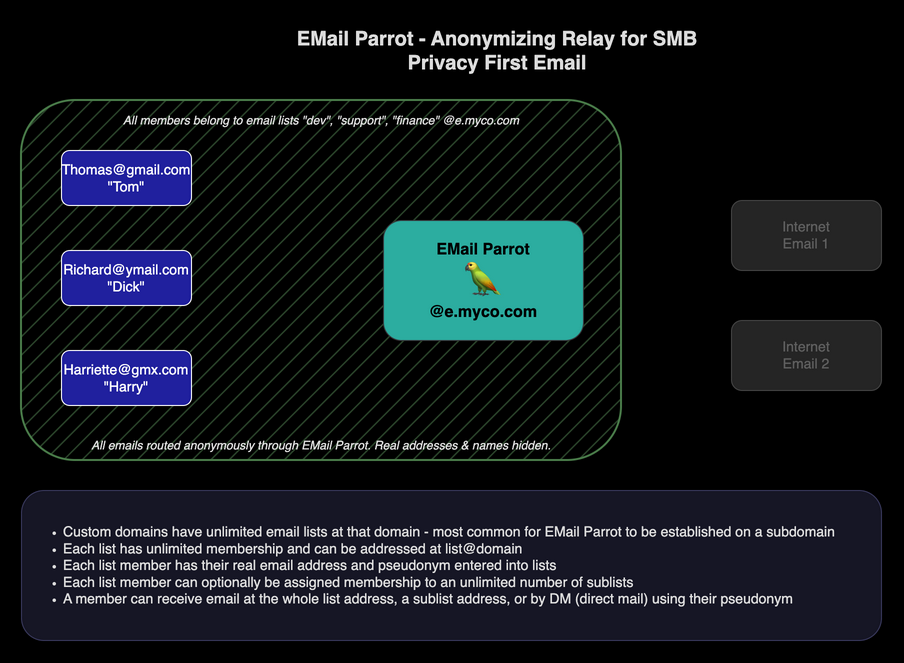
The overview diagram shows the full setup. On the left, inside the member boundary,
are Tom, Dick, and Harry with their personal addresses. In the center is EMail Parrot
at @e.myco.com. On the right are outside parties - clients, vendors, anyone else -
who are not members of any list.
All communication runs through EMail Parrot. The relay completely decomposes each inbound message and rebuilds a clean outbound one from scratch. No hidden tracking headers, no tracking pixels, and no metadata from the original sender passes through. Members communicate freely with each other - and, through VPE, with the outside world - without ever exchanging real addresses. This protection extends into attachments as well - real addresses embedded in calendar invites and contact cards sent through the list are rewritten too, not just the message body (see Address Protection in Attachments and Links).
Each list can have sublists for focused communication. A member can belong to any number of sublists and be reached at the sublist address directly. Members can also send private one-to-one messages using pseudonym addresses, covered in the Direct Message section below.
2. Group (Whole-List) Email
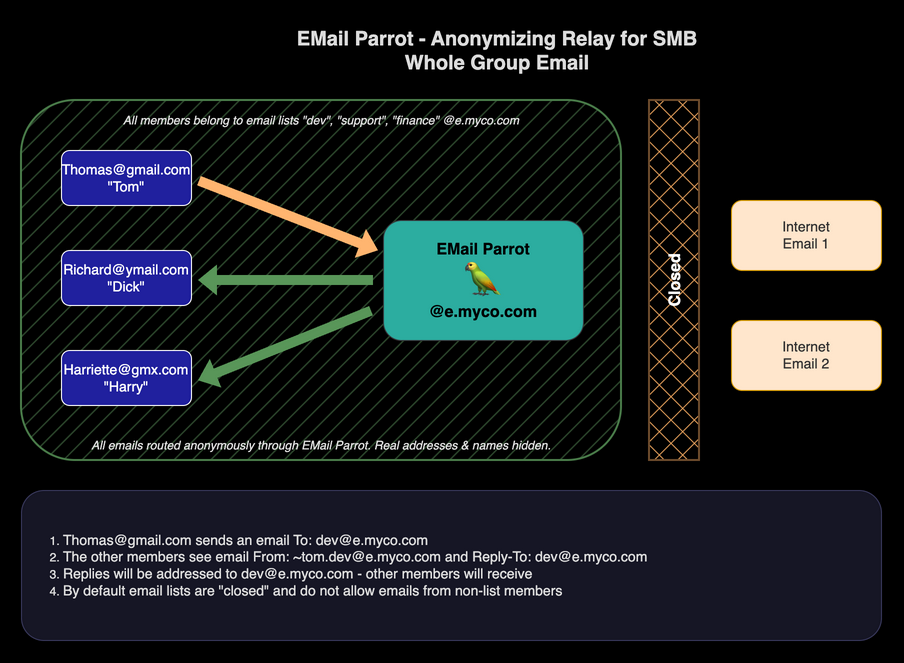
The most common case: a member sends a message to the entire list.
- Tom composes an email to
dev@e.myco.comfrom his personal Gmail account. - EMail Parrot receives it, strips all identifying information, and delivers a clean
message to Dick and Harry. They see the sender as
~tom.dev@e.myco.com- Tom’s pseudonym address on the dev list - not his real Gmail address. The Reply-To is set todev@e.myco.comso any reply goes back through the relay to the whole group. - If Dick replies, his real address is similarly hidden. Tom and Harry see the reply
arrive from
~dick.dev@e.myco.com.
3. Sublist Email
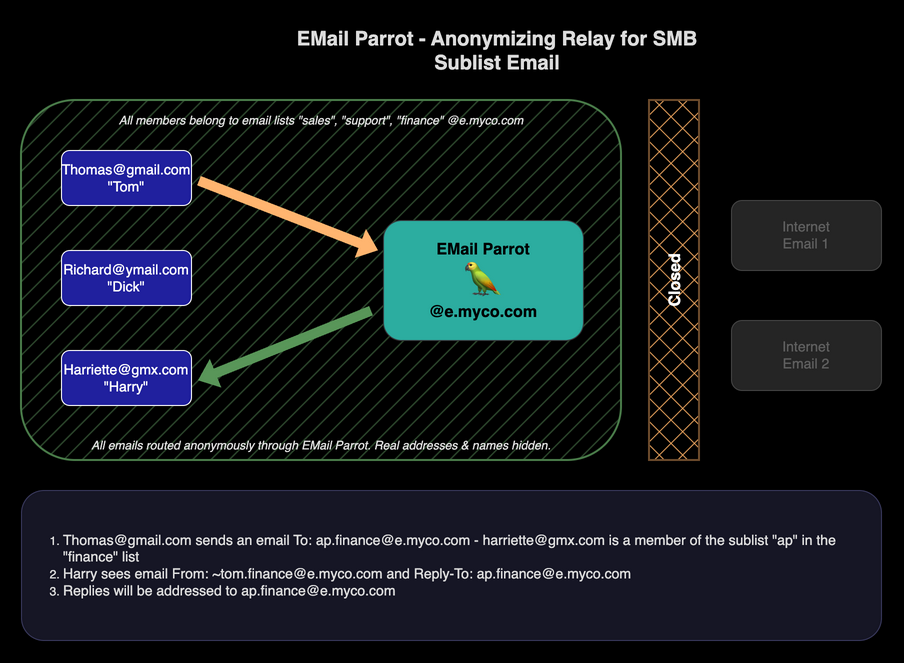
Sublists let you create focused channels within a list. Any member can belong to one
or more sublists, and each sublist is reachable at sublistname.listname@e.myco.com.
In this example, both Tom and Harry are members of the ap (accounts payable) sublist
within the finance list. Dick is not.
- Tom sends a message to
ap.finance@e.myco.com. Because Tom is the sender, EMail Parrot does not loop it back to him - only Harry receives it. - When Harry replies to
ap.finance@e.myco.com, the message routes back to Tom only. - If Dick sends a message to
ap.finance@e.myco.com, both Tom and Harry receive it.
This makes sublists practical for role-based routing within a team. The same three people can participate in the full finance list or in focused AP traffic, with no separate accounts or inboxes required.
4. Direct Message
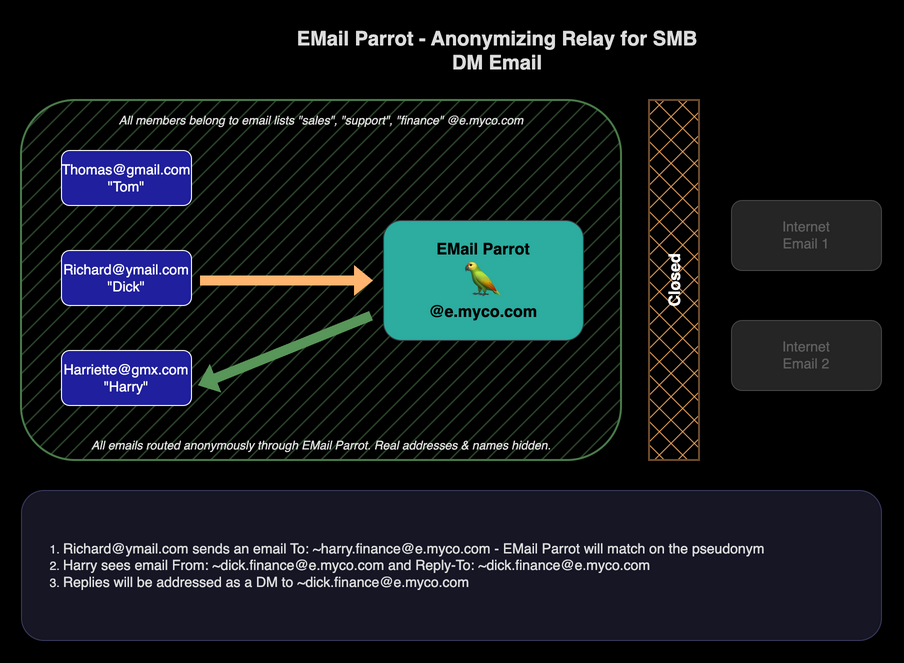
Members can send private one-to-one messages to each other through the relay without revealing real addresses.
The address format for a direct message is ~pseudonym.listname@e.myco.com. The tilde
character (~) at the start signals to EMail Parrot that this is a direct message to
a specific member, not a broadcast to the list or sublist.
Members can get a directory of all pseudonym addresses by emailing
addressbook.listname@e.myco.com. The reply lists every direct message address for
current members - no real addresses included.
In this example:
- Dick sends to
~harry.finance@e.myco.com- Harry’s direct address on the finance list. - Harry receives the message with Dick’s pseudonym address
~dick.finance@e.myco.comas the sender and Reply-To. Neither person’s real address is involved at any point. - Harry’s reply routes back to Dick via his pseudonym address.
5. VPE - Receiving from Outside
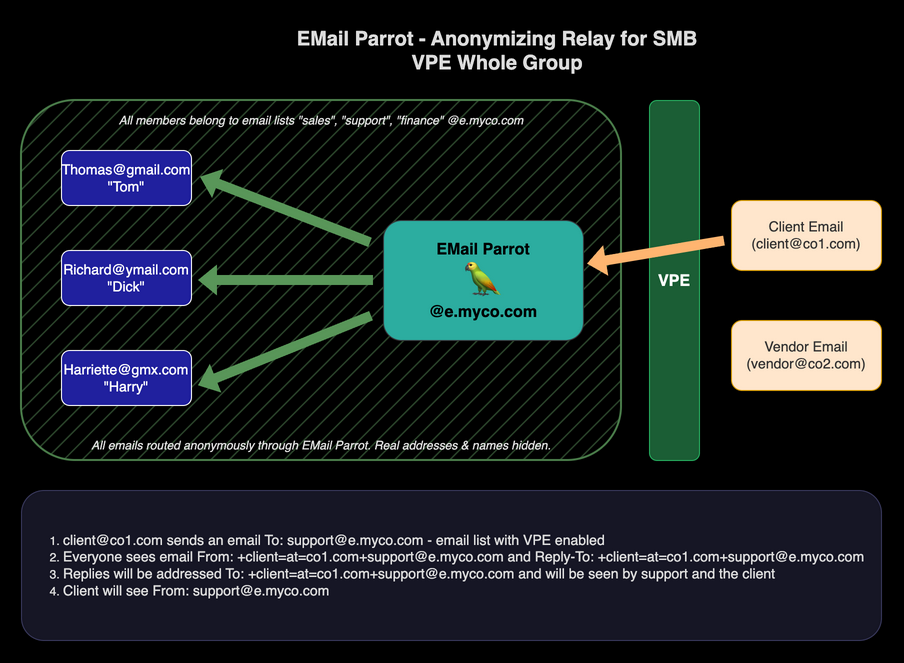
The diagrams above all show closed lists - groups that communicate internally with no outside contact. Virtual Private Email (VPE)1 extends the same anonymity and content screening to communication with people outside the group.
When a list is configured as open, outside parties can email into the list address. Their messages still go through the full EMail Parrot screening process - tracking pixels stripped, attachments scanned, spoofed senders blocked.
When EMail Parrot receives a message from outside on a VPE-enabled list, it creates a
special return-path address that encodes the sender’s address:
+sender=at=sender.com+listname@e.myco.com. This encoded address is used throughout
the conversation as the routing handle for that outside party - no raw external address
is ever visible to members or passed back to the sender.
In this example, Client@co1.com sends a message to support@e.myco.com:
- EMail Parrot accepts the message, creates the encoded return path
+client=at=co1.com+support@e.myco.com, and delivers the screened message to all members of the support list. Any member of the team can respond. - When a member replies, the message routes back through EMail Parrot to the client.
The client sees the reply arriving from
support@e.myco.com- not from any individual’s personal account. - A member who wants to take sole ownership of the conversation can address a reply to
+client=at=co1.com+frank.support@e.myco.com, wherefrankis a sublist with only that member in it. From that point forward, only that member receives the client’s replies, while still corresponding from a list address.
6. VPE - Sending Outbound
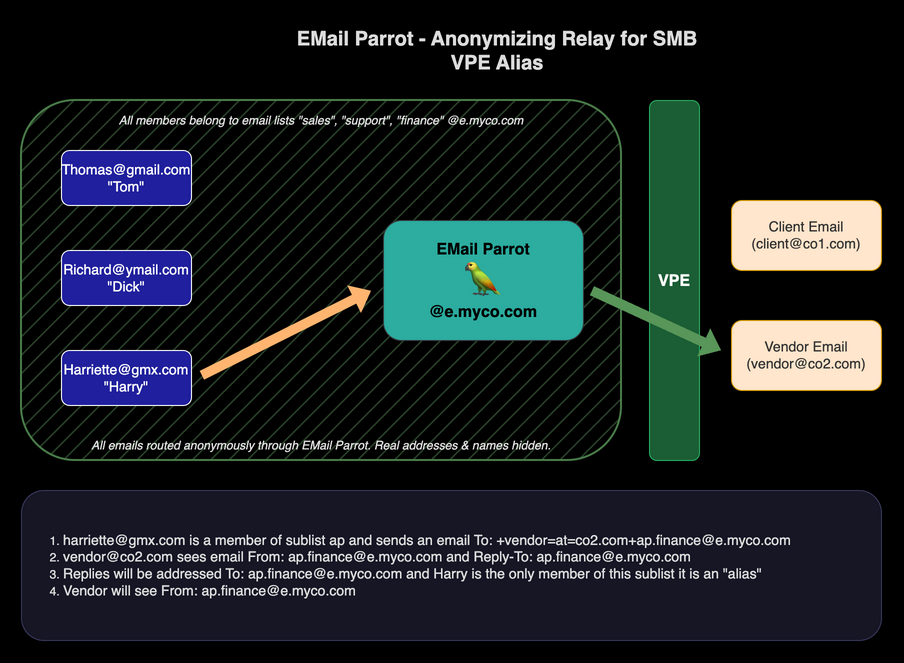
VPE also works in the outbound direction. A member can initiate contact with an outside party and have the full conversation route through EMail Parrot, with the member’s personal address hidden throughout.
The address format is: +recipient=at=recipient.com+listname@e.myco.com
Use the address conversion tool to convert any outside address to this format.
In this example, Harry (a member of the ap sublist in finance) needs to correspond
with a vendor at Vendor@co2.com:
- Harry sends to
+vendor=at=co2.com+ap.finance@e.myco.com. EMail Parrot routes the message to the vendor withap.finance@e.myco.comas the sender and Reply-To. - The vendor has no indication of who sent the message or from what personal account. They are corresponding with an accounts payable department at a company address.
- When the vendor replies to
ap.finance@e.myco.com, the reply routes back to Harry alone - because Harry is the only member of theapsublist.
Use Case Stories
Shared Support Inbox
A three-person business receives a support request at support@e.myco.com. All three
team members see the email arrive - routed and screened - with the customer’s message
intact and the customer’s address encoded in the return path. Any one of them can reply,
and the customer receives the response from support@e.myco.com.
One team member decides to take ownership. She replies to the customer using
+customer=at=domain.com+alice.support@e.myco.com, where alice is a sublist
containing only her. From that point, the customer’s replies route directly to her.
The rest of the team can be kept informed through an internal channel. The customer
never has her personal email address, and the business has a clean record of who
owns the thread.
When the team member goes on vacation, another person is added to the alice sublist
temporarily. The customer notices no change. The conversation continues from the same
address.
Appearing as a Larger Organization
Harriette runs a small consulting practice alone. She handles client projects, vendor
relationships, and finances. Her clients and vendors interact with her through a custom
domain at e.hconsulting.com.
She maintains a few addresses that present different faces of the business. For day-to-day
project work she uses harry.projects@e.hconsulting.com. For vendor invoices and payments
she uses ap.finance@e.hconsulting.com. For matters that carry organizational weight she
has a separate list, exec, with a sublist alias Brian_Swanson_CFO that routes to
her same inbox.
A vendor disputes a payment term and asks to escalate. Rather than explain that the company
is a one-person operation, Harriette composes a reply from
+vendor=at=vendor.com+Brian_Swanson_CFO.exec@e.hconsulting.com. The vendor receives a
message from exec@e.hconsulting.com, attributed to Brian Swanson, CFO. Brian responds
firmly and instructs Harry to proceed. The vendor, satisfied that the matter has been
escalated at the appropriate level, accepts the terms.
Neither persona required a separate email account or a separate inbox.
Contractor Rotation Without Address Exposure
A small agency uses a freelance team that changes quarterly. New contractors join project
lists; departing ones are removed. Clients communicate with project addresses like
west-coast-team@e.agency.com throughout an engagement.
When a contractor leaves, they are removed from the list. The address they used to communicate with clients stops routing to them. They cannot initiate further contact with those clients through the list address, and the clients have no direct line to that contractor’s personal email.
When a new contractor joins, they are added with a pseudonym. Ongoing conversations route to them alongside the rest of the team. No client thread has to be restarted.
Frequently Asked Questions
How is EMail Parrot different from Google Workspace or Microsoft 365? Google Workspace and Microsoft 365 give each person their own company email account billed per seat. EMail Parrot is a relay that sits in front of whatever addresses your team already has. There are no per-seat charges, no accounts to provision or deprovision, and no new inboxes to manage. The key difference is that EMail Parrot is built around privacy by design: outside parties never learn individual team members’ addresses, and walk-away contact information is structurally impossible.
Can contractors and freelancers use their personal email addresses? Yes. EMail Parrot does not care what address is behind each member’s pseudonym. A full-time employee with a corporate address and a contractor with a personal Gmail account both appear to outside parties as part of the same company relay. Neither’s real address is ever visible to clients, vendors, or each other.
What happens to client email threads when a team member leaves? You remove them from the list. Their routing stops immediately. Clients who reply to ongoing threads continue to reach the list address - those messages are delivered to whoever remains on the list. The departed member cannot send or receive through any list address they were part of, and clients have no direct line to that person because they never had their personal address.
Do clients know their email is being handled by a relay? They see a company address as sender and Reply-To. There is no indication in the message that a relay is involved. From the client’s perspective they are corresponding with a professional email address at your domain.
Can one person handle multiple company addresses - support, billing, sales - from a single inbox? Yes. A person can be a member of multiple lists and sublists simultaneously. All messages to any address they belong to arrive in their real inbox. They reply normally and the reply goes out through the appropriate list address automatically based on which message they are replying to.
We already have a company domain. Do we have to change our DNS?
For a custom domain setup, one DNS record pointing your subdomain to EMail Parrot’s servers is required. This is a one-time change that typically takes a few minutes. If you want to test first, start with a free list at emparrot.com - no DNS change needed - and migrate to your domain when ready.
See Also
- EMail Parrot for Personal Privacy - one alias per contact for individual email privacy
- EMail Parrot for Families - protecting family members with caregiver oversight
Getting Started
EMail Parrot requires no software installation for members. They use whatever email client they already have.
Create a free list at emparrot.com/admin/create_account. The first 30 days are free with no credit card required. No DNS setup is needed to start.
When you are ready to move to a custom domain, contact info@emparrot.com. Support will walk you through the DNS configuration and complete the setup on the EMail Parrot side.
For step-by-step configuration: Business Email setup guide
Once you are set up: User Guide – addressing, VPE daily use, and custom domain setup.
Pricing
| Option | Cost |
|---|---|
| Per list on emparrot.com | $5/month |
| Custom domain (unlimited lists) | $10/month |
No per-seat fees. No software to purchase or install. Volume surcharges apply above 5,000 email deliveries or 5 GB delivered per month across your account.
Questions: info@emparrot.com
VPE is patent pending (USPTO Application No. 19/377,461). ↩︎