Privacy-First Group Email with Virtual Private Email (VPE)
The Problem
Your family’s email addresses are everywhere. The school portal has one. The pediatrician’s office has another. Online retailers, subscription services, and the dozens of apps you signed up for over the years each hold a copy. Over time, those addresses accumulate in data broker databases, spam lists, and breach records. According to Have I Been Pwned, the average person’s email address appears in three to five separate data breaches.
This is not just an annoyance. Email is the key to almost every online account your family has - banking, healthcare, school records, social media. A compromised address gives an attacker a lever to reset passwords and impersonate family members across dozens of services simultaneously.
The risk is not evenly distributed within a family. Children’s information is especially valuable to data brokers because it comes with a lifetime of future targeting potential. Elderly relatives receive three times as many phishing attempts as younger adults, partly because their addresses have been circulating longer and partly because scammers have learned to target them specifically. Every email address you give out for a child or aging parent is another potential entry point for a threat that cannot be undone.
Traditional email services filter spam after it arrives. That helps, but it does not prevent your real address from ending up in breach databases, it does not stop tracking pixels embedded in commercial email, and it does not give you a way to protect a family member who is not well-positioned to recognize a sophisticated phishing attempt.
EMail Parrot addresses all of this with a single service. It acts as a relay between your family and anyone you communicate with, applying the same inbound screening used by enterprise email gateway tools. Family members never expose real addresses to outside parties. When an address gets compromised, you delete it and create a new one. And because the relay layer sits between family members and the outside world, you can give a caregiver visibility into a family member’s email without giving up anyone’s privacy or inbox independence.
What You Set Up
EMail Parrot works as a free list at emparrot.com - no DNS configuration needed to
start. Your family list might be family@emparrot.com. For families who want a custom
address, EMail Parrot can run on a subdomain of a family domain - for example,
family@e.smithfam.com. That is a one-time DNS change that typically takes a few
minutes. Either way, the service works identically.
Under that address you add family members. Each person is entered with their real email address and a family pseudonym - a short name that identifies them inside the relay without exposing who they are to anyone else. Pseudonyms are visible only within the family group.
A key property of membership: when a member is removed from the list, every address that formerly reached them stops working. An ex-partner, estranged relative, or anyone else removed from the list loses their ability to contact the family through it. The contact information they accumulated while they were a member does not route anywhere useful after they leave.
The examples throughout this document use a household of three:
- Mom (mom@gmail.com, pseudonym “mom”)
- Dad (dad@yahoo.com, pseudonym “dad”)
- Grandpa (grandpa@aol.com, pseudonym “gpa”)
All three belong to the family list at @emparrot.com. None of them can see each
other’s real addresses. Outside parties - schools, doctors, services - interact through
EMail Parrot and never learn who is on the other side.
How Email Flows
1. Overview
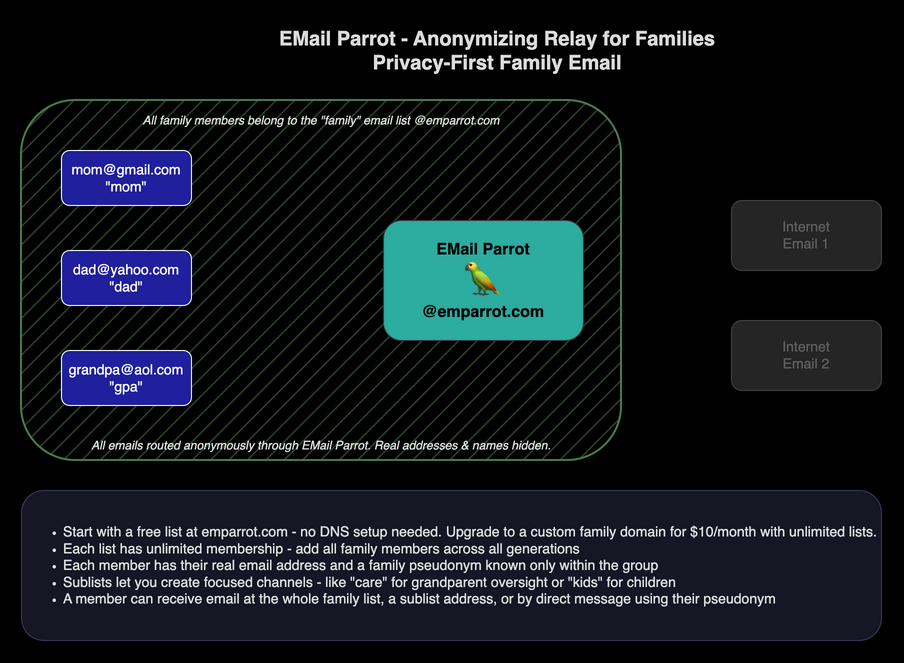
The overview shows the full setup. On the left, inside the member boundary, are Mom,
Dad, and Grandpa with their personal addresses. In the center is EMail Parrot at
@emparrot.com. On the right, shown in gray, are outside parties who are not family
members.
All communication runs through EMail Parrot. The relay completely decomposes each inbound message and rebuilds a clean outbound one from scratch. No hidden tracking headers, no tracking pixels, and no metadata from the original sender passes through. Family members communicate freely with each other and, through VPE, with the outside world without ever exchanging real addresses.
Each list can have sublists for focused communication. A member can belong to any number of sublists and receive email at the sublist address directly. The caregiver oversight pattern and the direct message feature are covered in the sections below.
2. Whole-Family Email
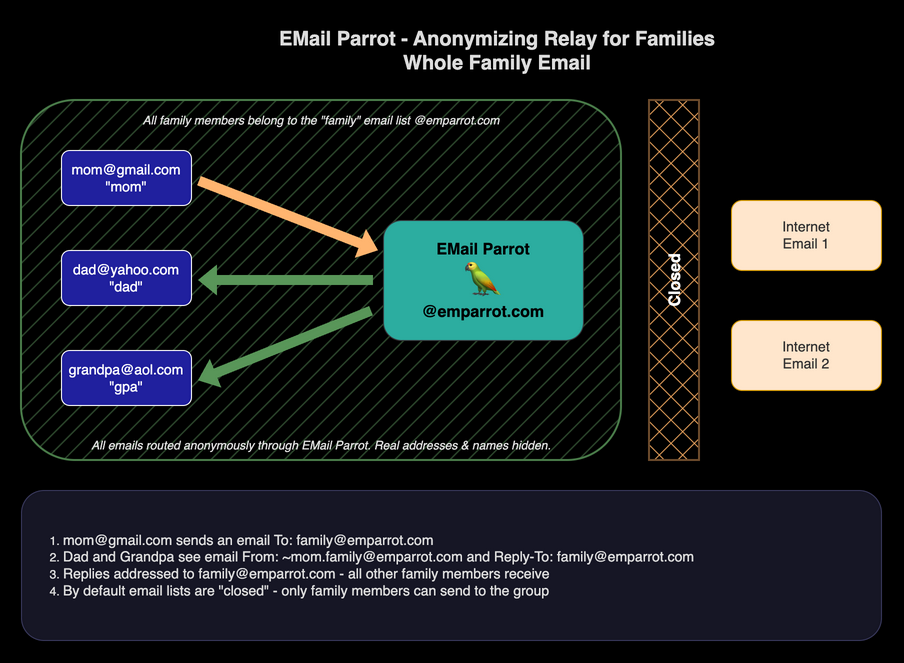
The most common case: a family member sends a message to everyone.
- Mom composes an email to
family@emparrot.comfrom her Gmail account. - EMail Parrot receives it, strips all identifying information, and delivers a clean
message to Dad and Grandpa. They see the sender as
~mom.family@emparrot.com- Mom’s pseudonym address on the family list - not her real Gmail address. The Reply-To is set tofamily@emparrot.comso any reply goes back through the relay to the whole family. - If Dad replies, his real address is similarly hidden. Mom and Grandpa see the reply
arrive from
~dad.family@emparrot.com.
The “Closed” indicator on the right side of the member area shows that this list is closed - only members can originate messages into it. This is the default for all lists and the right choice for any internal family discussion. The outside world cannot initiate contact with a closed list.
3. Sublist Email (Caregiver Oversight)
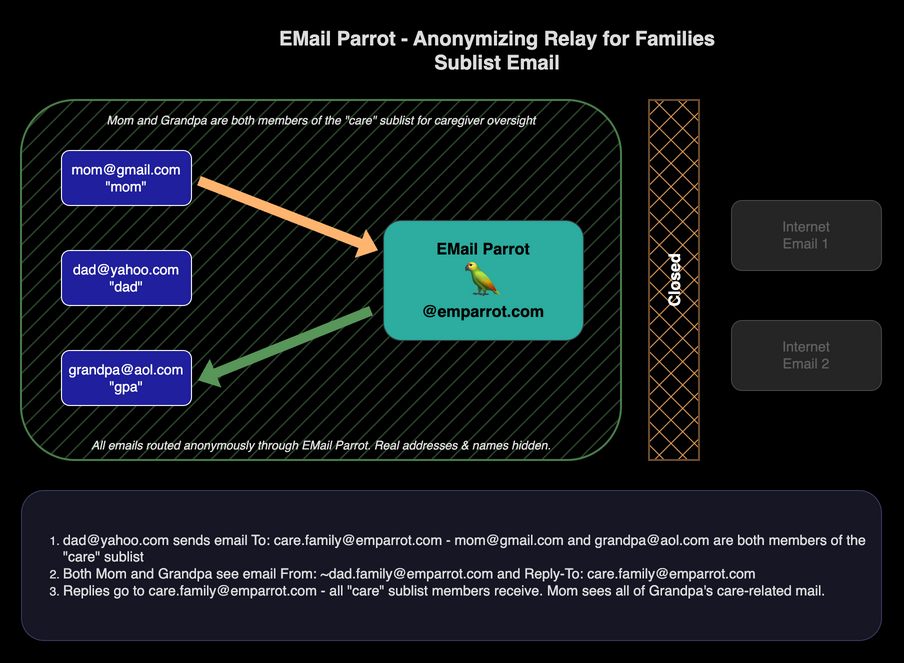
Sublists let you create focused channels within a list. The caregiver oversight pattern is one of the most powerful family applications of this feature.
In this example, Grandpa and Mom are both members of a care sublist within the
family list. This means any email sent to care.family@emparrot.com reaches both of
them. Mom, as Grandpa’s caregiver, is automatically copied on everything that goes
through that channel.
- Dad sends a message to
care.family@emparrot.com. - Both Grandpa and Mom receive it. Grandpa sees the sender as
~dad.family@emparrot.com. Mom also receives the message, keeping her in the loop on all care-related communication. - Replies to
care.family@emparrot.comgo back to allcaresublist members.
This pattern gives Grandpa a functioning email address for healthcare providers, insurance companies, and essential services while giving Mom visibility without having access to Grandpa’s personal inbox. Grandpa keeps independence; Mom keeps peace of mind.
The same pattern works for monitoring a child’s email from a specific sender - a tutoring service, a school administrator, or a sports coach. The child gets the message; the parent gets a copy.
4. Direct Message
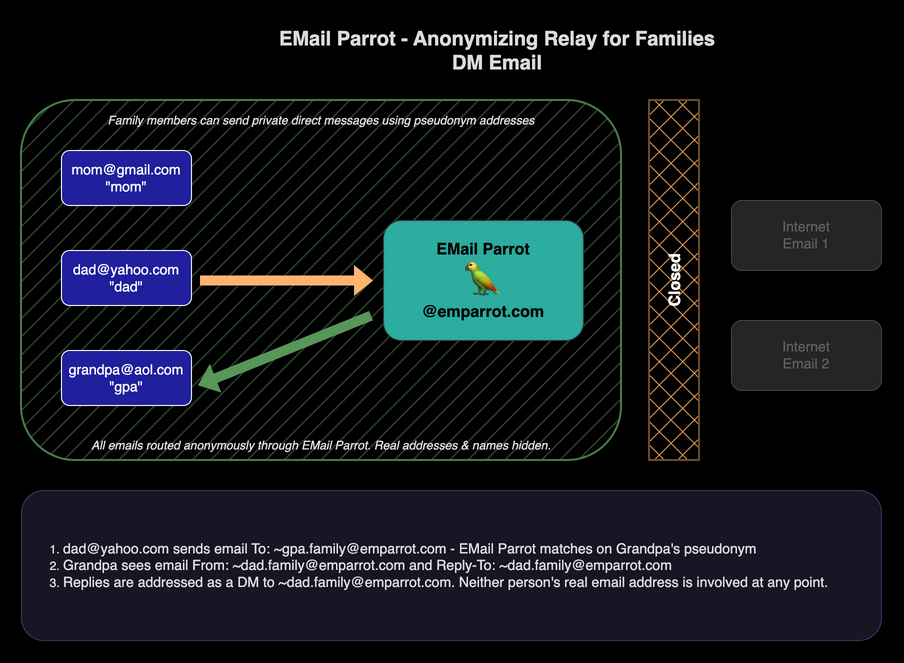
Family members can send private one-to-one messages to each other through the relay without revealing real addresses.
The address format for a direct message is ~pseudonym.listname@emparrot.com. The
tilde character (~) at the start signals to EMail Parrot that this is a direct
message to a specific member, not a broadcast to the whole family.
In this example:
- Dad sends to
~gpa.family@emparrot.com- Grandpa’s direct address on the family list. - Grandpa receives the message with Dad’s pseudonym address
~dad.family@emparrot.comas the sender and Reply-To. Neither person’s real address is involved at any point. - Grandpa’s reply routes back to Dad via his pseudonym address.
5. VPE - Receiving from Outside
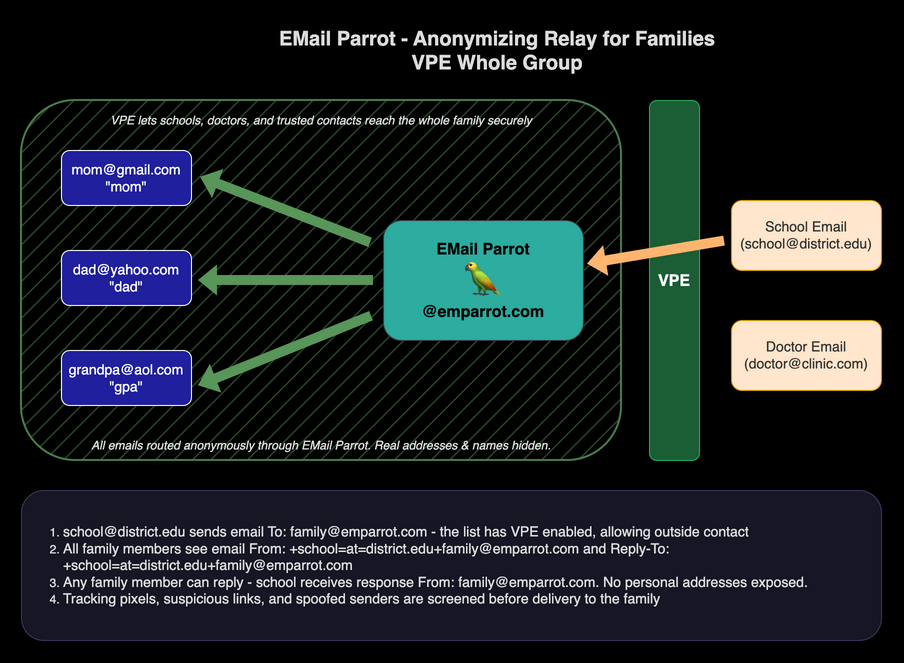
The sections above all show closed lists - the family communicating with itself, with no outside contact. Virtual Private Email (VPE)1 extends the same anonymity and content screening to communication with people outside the family group.
When a list is configured as open, outside parties can email into the list address. Their messages still go through the full EMail Parrot screening process - tracking pixels stripped, attachments scanned, spoofed senders blocked.
When EMail Parrot receives a message from outside on a VPE-enabled list, it creates a
special return-path address that encodes the sender’s address:
+sender=at=sender.com+listname@emparrot.com. This encoded address is used throughout
the conversation as the routing handle for that outside party - no raw external address
is ever visible to family members.
In this example, a school at school@district.edu emails family@emparrot.com:
- EMail Parrot accepts the message, screens it, creates the encoded return path
+school=at=district.edu+family@emparrot.com, and delivers the clean message to all family members. - Any family member can reply. The school receives the response from
family@emparrot.com- the family list address, not any individual’s personal account. - The school never has anyone’s personal email address. If the school’s records are
breached, attackers get only
family@emparrot.com, which routes nowhere useful without going through the relay.
This pattern works for any outside party the family wants to hear from without giving out real addresses: schools, healthcare providers, insurance companies, online retailers, or anyone else.
6. VPE - Sending Outbound
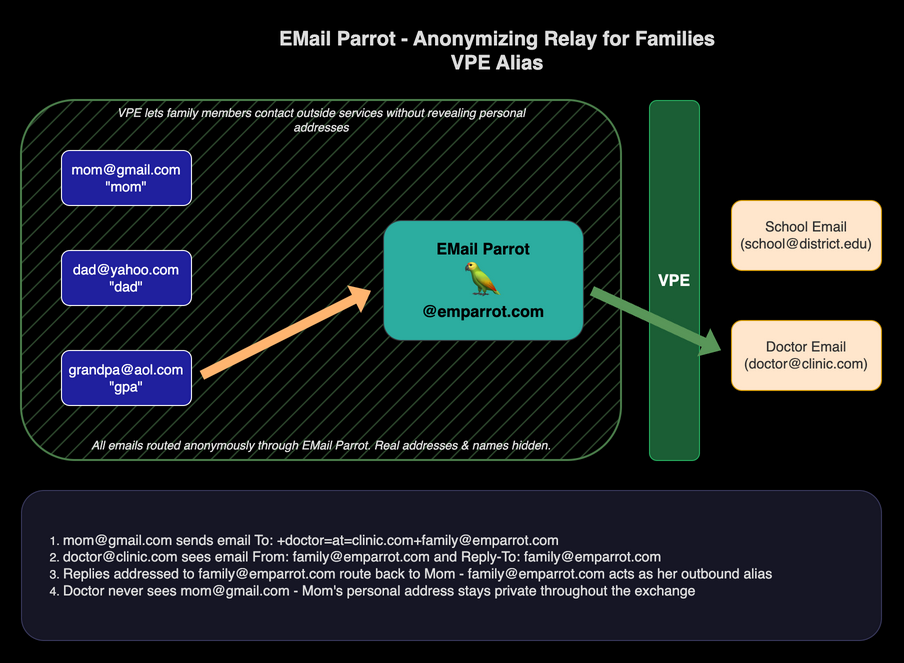
VPE also works in the outbound direction. A family member can initiate contact with an outside party and have the full conversation route through EMail Parrot, with the member’s personal address hidden throughout.
The address format is: +recipient=at=recipient.com+listname@emparrot.com
Use the address conversion tool to convert any outside address to this format.
In this example, Mom needs to correspond with a doctor at doctor@clinic.com:
- Mom sends to
+doctor=at=clinic.com+family@emparrot.com. EMail Parrot routes the message to the doctor withfamily@emparrot.comas the sender and Reply-To. - The doctor has no indication of who sent the message or from what personal account. They are corresponding with a family address.
- When the doctor replies to
family@emparrot.com, the reply routes back to Mom through the relay. Mom’s real Gmail address is never revealed.
If the doctor’s office sends a calendar invite for the appointment, or a contact card, the organizer/attendee and vCard EMAIL fields are rewritten the same way - see Address Protection in Attachments and Links.
Use Case Stories
The School Portal Problem
A parent signs up for the school’s online portal using family@emparrot.com instead of
a personal address. All school communications come through EMail Parrot - newsletters,
attendance notices, event reminders - screened for tracking pixels and phishing attempts
before delivery.
When the child graduates, the family address for that school can be disabled in thirty seconds. The school can no longer reach the parent’s personal inbox because they never had that address. When the school’s record-keeping system gets breached - it happens to school districts regularly - the attackers get only an address that routes nowhere useful without going through EMail Parrot.
The Grandparent Safety Net
Grandpa is 77 and not comfortable identifying phishing attempts. His email address has been circulating for 30 years and appears in multiple breach databases. Scammers specifically target email addresses with that kind of history.
Mom sets Grandpa up with a new Gmail account and adds him to the family list. She
creates a care sublist that includes both Grandpa and herself. Grandpa’s doctors,
his bank, and his insurance company are given care.family@emparrot.com as his email
address. All incoming email from those parties goes through EMail Parrot’s screening
and arrives in both Grandpa’s inbox and Mom’s.
EMail Parrot strips tracking pixels before delivery and blocks messages from spoofed senders that mimic trusted institutions. The sophisticated scams that get through are visible to Mom before Grandpa acts on them. She can call him and say “that Medicare email is fake, don’t click it” before any damage is done.
Grandpa keeps his own inbox and his independence. Mom does not need access to his personal email account to provide protection on the channels that matter most.
The Shopping Alias
Dad wants to buy a gift online without his purchase showing up in shared family inboxes.
He uses +giftshop=at=store.com+family@emparrot.com as the outbound VPE address to
contact the retailer. All order confirmations and shipping notices route back to him
through the relay with family@emparrot.com as the visible sender.
The store gets a consistent address to communicate with. Dad’s personal address is
never exposed. If the store starts sending promotional email, Dad can see that
family@emparrot.com is the address being spammed and can take action.
Frequently Asked Questions
Do family members need to switch email providers or change their existing address? No. Everyone keeps their current email account - Gmail, Yahoo, iCloud, or anything else. EMail Parrot sits in front of those accounts as a relay. Family members send and receive through their existing inbox without any changes to how they use it.
Can I see emails sent to my elderly parent without accessing their personal inbox? Yes. Add both your parent and yourself to a care sublist. Any email sent to that sublist address reaches both of you simultaneously. Your parent keeps inbox independence and you have visibility on the channels that matter most - doctors, insurers, financial services - without needing their password.
What happens if the school’s email system or a vendor gets breached?
The school or vendor has only your family relay address - something like family@emparrot.com. That address routes only through EMail Parrot and reveals nothing about individual family members. A breach at their end gives attackers an address that routes nowhere useful without going through the relay.
What happens when someone is removed from the family list? Every address that routed to them stops working immediately. An ex-partner, estranged relative, or anyone else removed from the list can no longer send messages through the list address or receive mail at any address that formerly reached them. The relay enforces this automatically.
Can I set up children on the family list? Yes. A common approach is to create a new free email account for a child (or use their existing one), add them to the family list with a pseudonym, and give schools, activity providers, and services the relay address instead of the child’s personal address. The child’s real account is never exposed.
Can family members email outside parties directly, or only reply to them?
Both. Any family member can initiate contact with an outside party using the VPE address format: +contact=at=theirdomain.com+family@emparrot.com. The address conversion tool generates this format. Replies from the outside party route back through the relay automatically.
Can a family member pause their own mail without asking the admin? Yes. Members can email a simple command address to pause delivery, resume it, toggle whether they get a copy of their own messages, or unsubscribe entirely - no admin action required. See the Member Guide for the full list of self-service commands.
See Also
- EMail Parrot for Personal Privacy - one alias per contact for individual email privacy
- EMail Parrot for Business Teams - the same relay protection for small business teams
Getting Started
EMail Parrot requires no software installation for family members. Everyone uses whatever email client they already have.
Create a free list at emparrot.com/admin/create_account. The
first 30 days are free with no credit card required. Your family list will be at
yourlist@emparrot.com.
For step-by-step configuration: Family Protection setup guide
Once you are set up: User Guide – addressing, daily use, and custom domain setup.
Questions: info@emparrot.com
Pricing
| Option | Cost |
|---|---|
| Per list on emparrot.com | $5/month |
| Custom family domain (unlimited lists) | $10/month |
No per-seat fees. No software to purchase or install. Volume surcharges apply above 5,000 email deliveries or 5 GB delivered per month across your account.
VPE is patent pending (USPTO Application No. 19/377,461). ↩︎